Project Overview
A bare-metal Space Invaders port targeting TI’s Tiva C (TM4C123GH6PM) LaunchPad. It drives a Nokia 5110 (PCD8544) 84×48 LCD over SPI, reads player input from buttons and an analog control (pot/slider) via the on-chip ADC, and organizes sprites/game state with simple data structures—all without an RTOS. The code is split into small drivers (SPI, UART, ADC, buttons, PLL/clock) plus a display layer and a game loop (see “main-driver.c” in repo) that advances gameplay and renders frames.
Demo Video
Github Repo
System Design
- MCU/Board: TI TM4C123GH6PM (Tiva C LaunchPad). Startup file and linker script are included (
tm4c123gh6pm_startup_ccs.c,tm4c123gh6pm.cmd). GitHub - Display: Nokia 5110 / PCD8544 84×48 monochrome LCD, driven via SPI. There’s a dedicated display driver (
Nokia5110.c/.h) and an abstraction on top (Display_Engine.c/.h). An SPI HAL (SPI_Driver.c/.h) backs it. GitHub - Inputs:
- Debug/telemetry:
UART_Driver.c/.hprovides serial output for logging or tuning. GitHub - Clocking:
PLL_Init.c/.hsets a higher core frequency for smoother game timing and faster SPI transfers. GitHub
Firmware design (module map)
- Main/game loop:
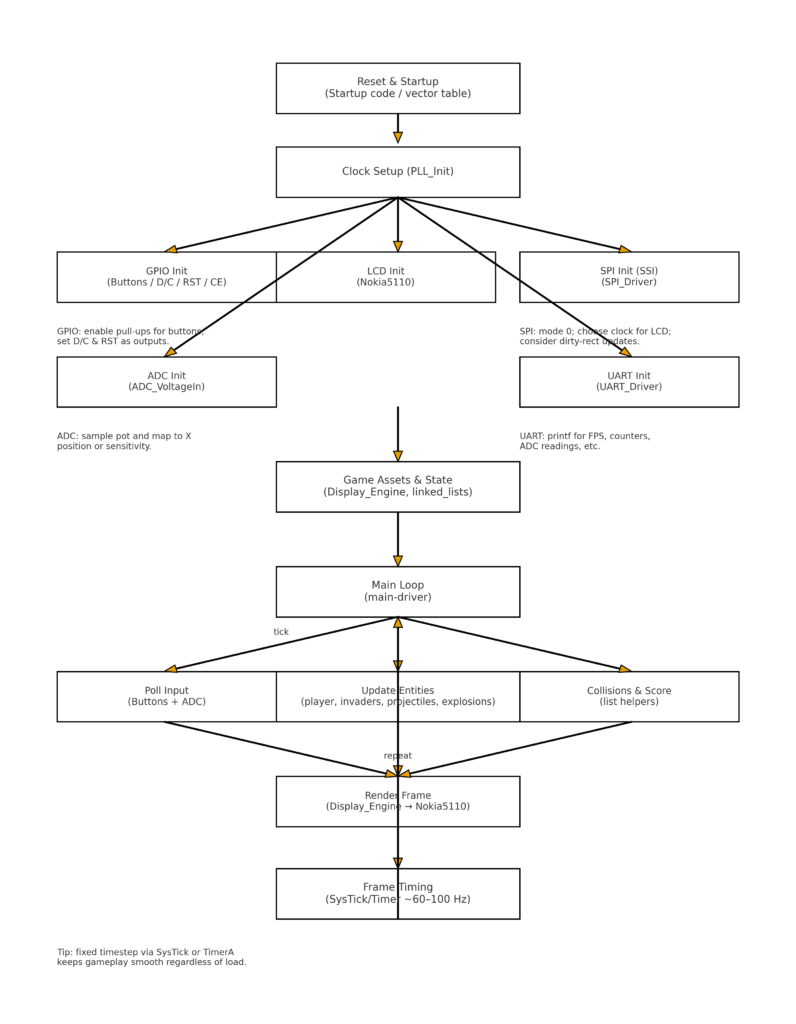
main-driver.cties it all together—initializes clock, GPIO, SPI/LCD, input, then runs the update→render loop for aliens, player, bullets, collisions, score, and lives. GitHub - Display stack:
- PCD8544 driver: low-level commands (set addressing mode, contrast, clear, send scanlines) live in
Nokia5110.c. - Display_Engine: draws sprites/text, maintains a back buffer (or issues minimal diffs) and offers convenience calls (draw bitmap, blit rows/columns, clear regions), consumed by the game loop. GitHub
- PCD8544 driver: low-level commands (set addressing mode, contrast, clear, send scanlines) live in
- Peripherals/HAL:
- SPI_Driver: configures SSI peripheral (mode, clk, frame format) and does blocking/non-blocking writes to the LCD. GitHub
- ADC_VoltageIn: sets up the ADC sequencer and scaling to deliver normalized positions/thresholds for control input. GitHub
- Button: initializes GPIO inputs (with pull-ups/downs), performs debouncing and edge detection (tap/hold) for “fire,” “start,” etc. GitHub
- UART_Driver: configures the UART for printf-style debug (FPS, ADC values, collisions per frame). GitHub
- PLL_Init: bumps SYSCLK for stable timing and higher SPI throughput, which reduces visible tearing/flicker on the 5110. GitHub
- Data structures:
linked_lists.c/.hsuggests simple container(s) for dynamic entities—bullets, invader rows, explosions—so the loop can add/remove without heavy allocation. GitHub - Startup/linker: TI CCS project files plus the
tm4c123gh6pm_*startup and headers define vectors, sections, and device registers. GitHub
Peripherals actually used (and why)
- SSI/SPI → LCD refresh via
Nokia5110+SPI_Driver. Critical for pushing 84×48 bitmap data lines efficiently. GitHub - ADC → smooth analog input (ship movement/aiming or difficulty slider) in
ADC_VoltageIn. GitHub - GPIO → buttons with debounce in
Button. Likely also used for LCD control pins (D/C, RST, CE) alongside SPI signals. GitHub - UART → instrumentation and debugging (
UART_Driver). GitHub - System PLL → consistent timing + faster pixel throughput (
PLL_Init). GitHub
Game event loop
- Poll inputs: read buttons and sample ADC; convert to player velocity/command.
- Update world: move player, advance invaders, step bullets/explosions, run collision checks; maintain entities via the linked-list helpers.
- Render: draw background/score HUD, blit sprites into the LCD’s buffer via
Display_Engine, then flush over SPI to the PCD8544. - Timing: maintain a fixed (or near-fixed) tick using busy-wait/loop cadence or a simple periodic interrupt (the repo doesn’t show a dedicated timer module, so the loop itself likely paces frames). GitHub
Diagrams
                          ┌───────────────────────────────┐
                          │        PC / USB (CDC)         │
                          │  Serial console (115200 8N1)  │
                          └───────────────┬───────────────┘
                                          │  UART0 TX/RX
                                          │  (PA1/PA0)
┌──────────────────────────────────────────┴──────────────────────────────────────────┐
│                             TI Tiva C LaunchPad                                    │
│                             TM4C123GH6PM (3.3V)                                    │
│                                                                                    │
│   SPI / SSI0                 GPIO (LCD ctrl)                 ADC                   │
│   ┌──────────────┐           ┌──────────────┐                ┌──────────────┐      │
│   │ PA2  SSI0CLK ├──────────►│  D/C   (GPIO)├───────────────►│  AINx   (PE3)│◄─────┼─── Wiper (10k pot)
│   │ PA5  SSI0TX  ├──────────►│  RST   (GPIO)│                └──────────────┘      │
│   │ PA3  SSI0FSS ├──────────►│  CE    (GPIO)│                                      │
│   └──────────────┘           └──────────────┘                                      │
│                                                                                    │
│   GPIO (buttons)                                                                    │
│   ┌──────────────┐                                                                  │
│   │ Px_y (IN+PU) ├───────┐   ┌──────────────┐                                      │
│   │ Px_z (IN+PU) ├───────┼──►│  Debounce in  │  (Button driver)                    │
│   └──────────────┘       │   └──────────────┘                                      │
│                          │                                                         │
│  3.3V ───────────────────┼──────────────────────────────────────────────────────┐  │
│  GND  ───────────────────┼──────────────────────────────────────────────────┐   │  │
└───────────────────────────┴──────────────────────────────────────────────────┴───┴──┘
                                          │
                                          │  SPI + ctrl + power
                                          ▼
                         ┌────────────────────────────────────────┐
                         │        Nokia 5110 LCD (PCD8544)        │
                         │  VCC  ◄───────────── 3.3V              │
                         │  GND  ◄───────────── GND               │
                         │  SCLK ◄───────────── PA2 (SSI0CLK)     │
                         │  DIN  ◄───────────── PA5 (SSI0TX/MOSI) │
                         │  CE   ◄───────────── PA3 (SSI0FSS/CS)  │
                         │  D/C  ◄───────────── GPIO              │
                         │  RST  ◄───────────── GPIO              │
                         │  LED  ◄──── 3.3V via R (or GPIO+R)     │
                         └────────────────────────────────────────┘


           10k Potentiometer                             Momentary Buttons
           ┌───────────────┐                            ┌───────────────┐
  3.3V  ──┤◄───────────────┼───────────────┐           │  One side → GND│
  GND   ──┤◄───────────────┼───────────────┘           │  Other → Px_y  │→ (GPIO IN, pull-up ON)
  Wiper ──┤───────────────►│  PE3 / AIN0               │  (repeat for more buttons)
           └───────────────┘                            └───────────────┘
Nice touches & extension ideas
- Double buffering / dirty-rects: If not already, keep a shadow buffer and only push changed regions to the LCD to minimize SPI traffic and flicker—PCD8544 benefits a lot from that.
- Consistent tick source: Move frame pacing to a hardware timer interrupt (e.g., SysTick/Timer0A at 60–100 Hz) so input/render cadence is independent of workload.
- Sound FX: Add a 4-bit or R-2R DAC on a GPIO port or use PWM (Timer) for simple square/triangle waves (shoot, explosion, march).
- Pin mux doc: Add a README table mapping SSI/UART/ADC/Buttons to exact pins for quick bring-up.
- Assets: Put 1-bit sprite bitmaps (aliens, player, shields, digits) into a dedicated header and compress rows to reduce flash.